
S.03 / AUTOMATION

Business process automation with AI, without making AI the problem.

AI process automation uses rules, integrations and artificial intelligence so your company’s repetitive steps run on their own. Step by step, I choose the most reliable piece: a rule, an integration, a work queue, an AI model or a person who approves.

Automation with the right piece at every stepRules, APIs, workflows and AI combine into an automated process that finishes the work, raises an alert or leaves it ready for a person to approve.01RULES02APIS03WORKFLOWS04AIPROCESSDONEALERTHUMAN APPROVALAutomation with the right piece at every stepRules, APIs, workflows and AI combine into an automated process that finishes the work, raises an alert or leaves it ready for a person to approve.RULESAPISWORKFLOWSAIPROCESSDONEALERTHUMAN APPROVAL

02 / PROBLEM

Automating doesn’t mean adding an AI agent.

Automation that fails almost never fails for lack of intelligence. It fails for lack of rules.

An agent that decides on its own is impressive in a demo and hard to defend in production: it doesn’t always do the same thing, it costs money every time it thinks and, when it gets it wrong, nobody knows exactly why.

Most business processes have a perfectly predictable part and a part that needs judgement. Automating well means separating them and giving each the tool it needs.

  • RULES

    Whatever can be written as a condition is written. Exact, and free per run.

  • APIS

    Systems talk to each other; nobody copies data from one screen to another.

  • WORKFLOWS

    Queues and scheduled jobs that keep running even when nobody has a browser open.

  • SOFTWARE

    Validation, formats and calculations on the server, where they can be tested.

  • AI

    Only for what rules can’t cover: language, images, judgement, variation.

  • HUMAN

    A person approves anything with consequences. The system prepares the work for them.

03 / SIGNALS

Processes that are asking to be automated.

If the work is repetitive and you already know how it should be done, it probably doesn’t need a person. It needs rules.

  1. 01Someone spends every morning copying data from one system to another.
  2. 02A process stops when the person who knows it is on holiday.
  3. 03Errors always show up in the same manual step.
  4. 04There are alerts that should fire on their own but depend on someone checking a list.
  5. 05The team classifies or summarises material by hand that arrives every day.
  6. 06You already tried “an AI agent” and nobody trusts what it does.
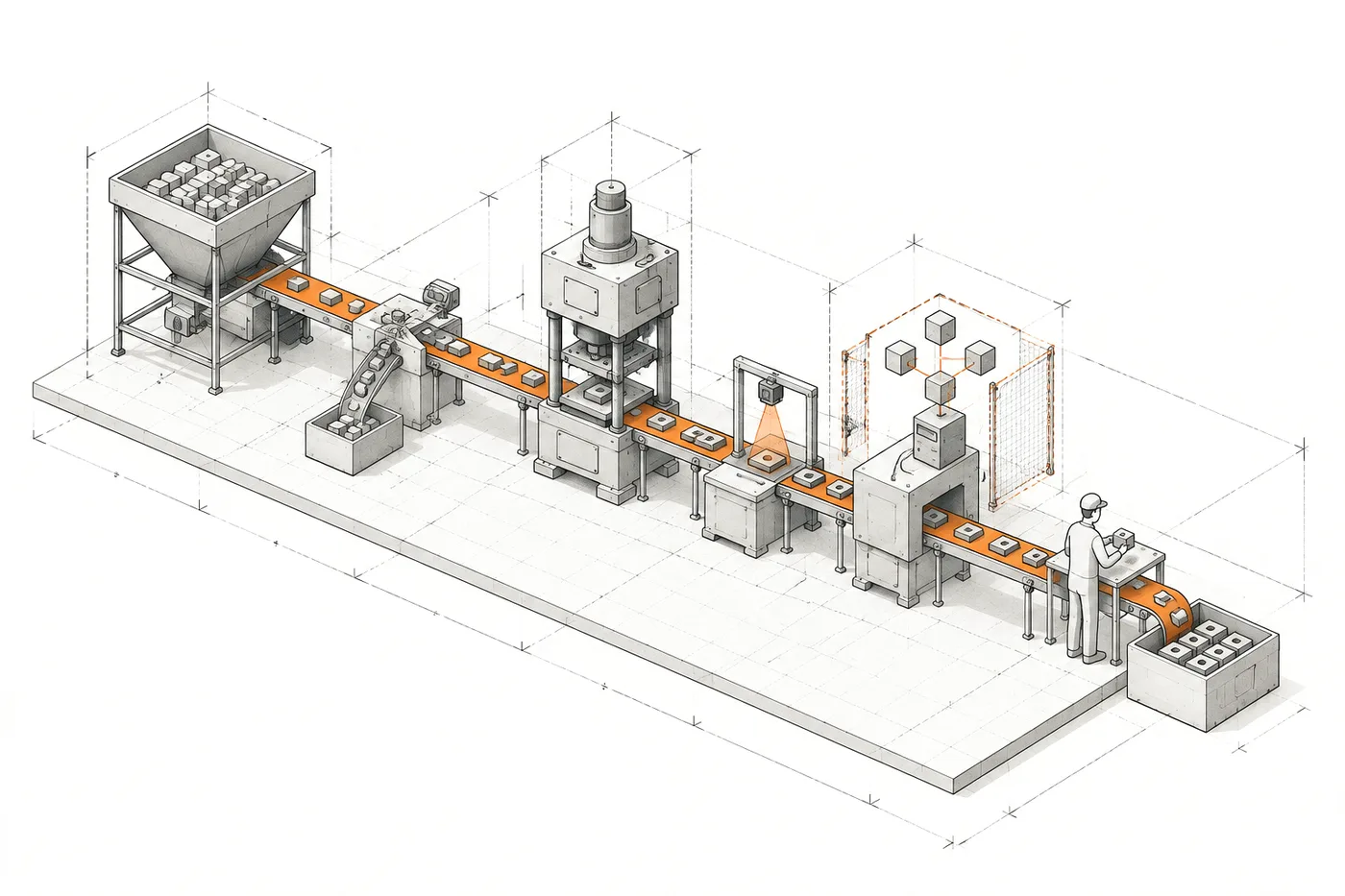
FIG. 03Mechanical stations, a single fenced AI step and a person who approves at the end
Axonometric drawing of a production line: hopper, sorter, press and quality check on an orange conveyor; one station holds a network of nodes inside a dashed fence and at the end a person approves before the output tray

04 / EXAMPLES

Which processes can be automated.

Six common processes and the piece that solves each one. AI shows up in half of them; in the other half it isn’t needed.

  1. Incoming invoices and delivery notes

    AI extracts supplier, amounts and dates from PDFs in different formats; rules check them against the order and a person approves discrepancies.

    AI + RULES + HUMAN
  2. Incoming emails and requests

    Classified by type and urgency, with the request details extracted and the task created in the right system.

    AI + RULES
  3. Syncing between systems

    Customers, orders or stock that move on their own from one tool to another, validated on entry. No AI needed here.

    RULES + APIS
  4. Document classification

    Contracts, CVs, reports or photos sorted and tagged; with rules if the vocabulary is closed, with AI if it isn’t.

    RULES OR AI
  5. Reports and alerts

    The Monday report that generates itself, and alerts that fire when a figure goes out of range, with their evidence.

    RULES + SCHEDULE
  6. Campaigns and sales follow-up

    Batched send queues, automatic exclusions and follow-up tasks that create themselves.

    RULES

05 / FIT

When automating makes sense.

When the process is understood, it repeats and the cost of a manual mistake is already known.

Automating makes sense if…

  • The task repeats many times with the same logic and you already know how it should be done.
  • The data already exists in one system and has to reach another, with its own format and validation rules.
  • There’s material to classify, summarise or prepare in volume, and a person can review the result.
  • A mistake in the manual process has a known cost and always appears in the same steps.

06 / WHAT I BUILD

What I’d automate in your business.

Six kinds of automation already running in real systems. AI appears only where rules can’t reach.

  • 01

    Repetitive tasks

    What’s now someone’s daily routine (preparing, copying, sending, checking) turned into a scheduled, logged process.

  • 02

    Syncing between systems

    Data that travels on its own between sources and tools, validated on entry, so it’s entered only once.

    EvidenceRocio.com

  • 03

    Classification and extraction

    Incoming text or material turned into fields, categories or scores. With rules if the vocabulary is bounded; with AI if it isn’t.

    EvidenceZentia

  • 04

    Generation with verifiable output

    Drafts, configurations or files generated with AI and validated by the server before they’re accepted.

  • 05

    Alerts that don’t depend on looking

    Rules that watch the data and flag what needs attention, with the evidence that explains it.

    EvidenceAtalayaIQ

  • 06

    Editorial processes with approval

    The system watches sources, archives and prepares; a person decides what gets published and the server checks the conditions are met.

    EvidenceRocio.com

07 / ARCHITECTURE

AI process automation: every step with the most reliable piece.

The same skeleton works for almost any process. What changes is which piece runs each step.

FIG. 07Trigger → classify → act → validate → approve → log
  1. 01 — TRIGGER

    Trigger

    An event, a schedule or new data starts the process.

    • SCHEDULE
    • API
    • EVENT
  2. 02 — CLASSIFY

    Classify

    What it is, how urgent it is, where it goes.

    • RULES
    • AI
  3. 03 — ACT

    Act

    The work gets done: sync, generate, queue, notify.

    • WORKFLOW
    • SOFTWARE
  4. 04 — VALIDATE

    Validate

    The server checks formats, limits and business rules.

    • SCHEMAS
    • RULES
  5. 05 — APPROVE

    Approve

    Anything with consequences is confirmed by a person.

    • HUMAN
  6. 06 — LOG

    Log

    What happened, when, at what cost and who approved it.

    • AUDIT
    • COST

08 / MEASURE

How automation savings are measured.

An automation nobody measures ends up being an opinion.

  1. BEFORE

    Before automating, the process is measured as it is: how often it happens, how long each run takes and how many errors have to be fixed.

  2. COST

    The cost of the automation per run is calculated, including the AI model when there is one.

  3. AFTER

    Afterwards the same things are measured from the system’s own logs, not from impressions.

  4. REVIEW

    If an automation doesn’t save what it promised, it gets fixed or retired. Keeping something that doesn’t pay off also costs.

09 / EVIDENCE

Automation in a real system.

An editorial radar with human approval, plus a sales automation that needed no AI at all.

Rocio.com home page: the «El Rocío al completo» guide and a conversational search over more than three decades of archive.
Home page and conversational archive · rocio.com

Editorial platform

Rocio.com

An editorial process automated right up to the edge of publication, where a person decides and the server checks the conditions.

  • A radar of 169 public sources: Facebook, Instagram, RSS, WordPress and the web.
  • A job queue that keeps running even when the browser is closed.
  • Publishing requires a supporting signal and original writing; the server checks it.
  • AI assistance for drafting standfirsts and improving articles inside the panel itself.

STACK Nuxt / Vue / MySQL

Case study: Rocio.com

ALSO BUILTGustela CRM, a complete sales automation without a single model call: send queues that build themselves, exclusion rules applied before queuing, batch processing within a daily limit and a simulated mode to test the whole flow without sending any email.

10 / DON'T AUTOMATE

What NOT to automate.

Automation amplifies what already exists. If the process isn’t clear, it amplifies the mess.

Better not to automate…

  • Ambiguous processes, where two people on the team would do different things with the same case.
  • Exceptions nobody understands yet: automating them only hides them.
  • Decisions that still need human judgement and are costly to get wrong.
  • Broken processes. Automating a bad process produces errors faster; redesign it first.
  • Tasks that happen three times a year: the system will cost more than it saves.

11 / QUESTIONS

Questions about process automation.

01

What is process automation?

Having a system carry out the repetitive steps of a business process (receiving, classifying, copying, validating, alerting) so a person doesn’t have to do them by hand. AI process automation adds artificial intelligence only in the steps with text, images or too much variation to handle with rules.

02

What’s the difference between task automation and process automation?

Automating a task removes one isolated step, such as renaming files or sending an email. Automating a process chains the steps end to end, with their validation, their exceptions and the person who approves. The first saves minutes; the second changes how the team works.

03

Does automating a process mean using an AI agent?

No. Most reliable automations are rules, integrations and work queues. AI is reserved for the steps rules can’t cover (language, images, judgement) and always with server-side validation behind it.

When NOT to use artificial intelligence
04

Why not use Zapier, Make or n8n?

They’re often the best option: for connecting well-known tools with simple steps, they’re fast and cheap. Custom automation makes sense when there are business rules of your own, volume, sensitive data, or when the process lives inside a system that’s already yours.

05

What happens when the automation gets it wrong?

It’s designed so that it shows and can be undone: validation before acting, a log of every run and human approval for steps with consequences.

06

Can it be tested safely before going live?

Yes, and it should be. A simulated mode runs the whole flow and logs it without any real effect, such as sending an email or writing to another system.

12 / SAME SYSTEM

Related systems.

A business problem rarely lives in a single piece. These usually appear in the same project.

All systems

Which process is stealing hours from your team?

Tell me what repeats, which systems it lives in and where the errors show up. I’ll tell you which part can be automated with rules, which deserves AI and which should stay with a person.