S.02 / DATA

Turn the data your business already has into decisions.

Your data already lives in the ERP, the CRM, spreadsheets, databases and management tools. Storing it is not the problem. Turning it into answers is.

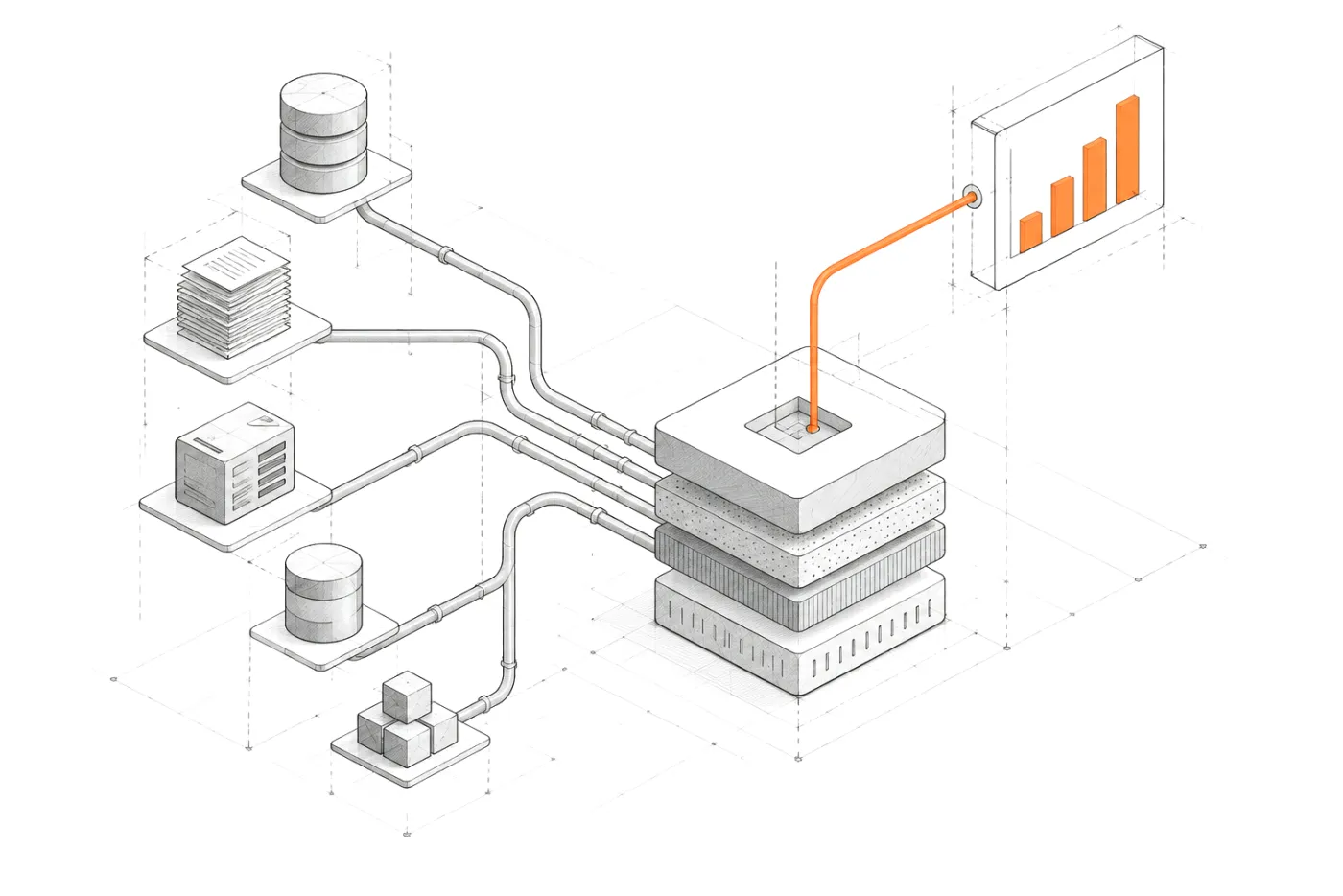
From scattered sources to decisionsERP, CRM, spreadsheets, MySQL databases and APIs converge in a data layer that produces dashboards, alerts and answers.01ERP02CRM03SPREADSHEETS04MYSQL05APISDATA LAYERDASHBOARDSALERTSANSWERSFrom scattered sources to decisionsERP, CRM, spreadsheets, MySQL databases and APIs converge in a data layer that produces dashboards, alerts and answers.ERPCRMSPREADSHEETSMYSQLAPISDATA LAYERDASHBOARDSALERTSANSWERS

02 / SIGNALS

When the data exists but does not work.

The information is already in your business. What is missing is a layer that organizes it, gives it meaning and puts it in front of the people who decide.

  1. 01Reports are put together by hand every week or every month.
  2. 02Every department has its own version of the numbers.
  3. 03Data arrives when it is too late to act on it.
  4. 04Nobody knows for sure what each field means.
  5. 05Important decisions are made on instinct because checking takes too long.

03 / FROM DATA TO DECISION

A dashboard is not the goal. A decision is.

Dashboards are not decoration. Every view should end in something a person can decide or do, and every number behind it should be traceable to its source.

FIG. 02Data sources → definitions → data layer → analysis → alerts → decisions
  1. 01 — SOURCES

    Data sources

    Read where the data already lives. Migrating is a decision, not a requirement.

    • ERP
    • CRM
    • MySQL
    • APIs
    • Spreadsheets
  2. 02 — DEFINITIONS

    Definitions

    What each field contains, what it means and what caveats it carries. Written down and verified.

  3. 03 — DATA LAYER

    Data layer

    One reliable reading of the sources: fair comparisons, explicit coverage, read-only access.

  4. 04 — ANALYSIS

    Analysis

    Explicit rules and comparisons that explain what changed and why, reconciled against the source.

  5. 05 — ALERTS

    Alerts

    What needs attention, with the evidence that triggered it. Not another chart to check.

  6. 06 — DECISIONS

    Decisions

    A briefing and a short action plan for the people who have to act on it.

    • Briefing
    • Actions
FIG. 03From scattered sources to a layer with meaning
Scattered data sources converging into a structured layer and from there into a chart

04 / WHAT I BUILD

What I build with your data.

From source to decision: integration, meaning, visualization, alerts and, when it adds value, natural language.

  • 01

    Source integration

    Connecting ERP, CRM, databases, APIs and spreadsheets so information stops being scattered.

    EvidenceRocio.com

  • 02

    A data layer with meaning

    Every table and field with a verified definition: what it contains, what it means and how it can be used.

    EvidenceAtalayaIQ

  • 03

    Custom dashboards and reports

    Views designed around the decision each person has to make, not a catalogue of generic charts.

    EvidenceAtalayaIQ · Zentia

  • 04

    Alerts and findings

    Explicit rules that detect what needs attention and show the evidence behind each alert.

    EvidenceAtalayaIQ

  • 05

    Periodic briefings

    A daily or weekly summary of what matters and an action plan, instead of building the report by hand.

    EvidenceAtalayaIQ

  • 06

    Natural-language questions

    An assistant that answers questions about your data through controlled queries. The AI layer only comes once the data layer is solid.

    EvidenceAtalayaIQ · Rocio.com

05 / EVIDENCE

Seven years of operational data, turned into answers.

AtalayaIQ is the intelligence layer I built on top of the time-tracking system of a national events company. The data already existed. The missing piece was a reliable intelligence layer.

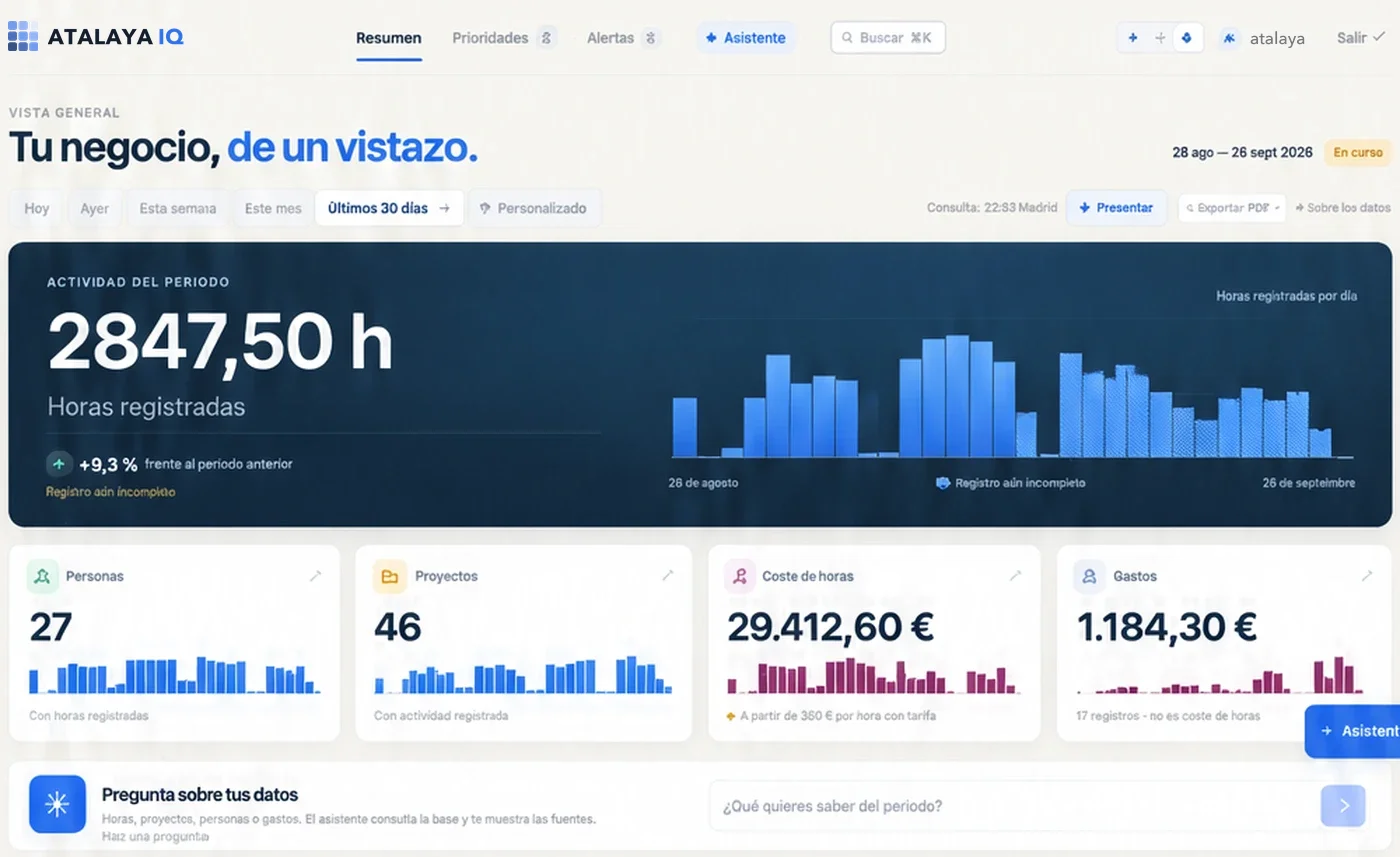
AtalayaIQ overview: hours logged over the last 30 days with their daily series, people, projects, labour cost and expenses.
Overview · last 30 days

Business intelligence

AtalayaIQ

Business intelligence on a company’s real data, without migrating its system or touching what already worked.

  • A daily and weekly briefing, an action plan and alerts on the real data from the existing system.
  • Read-only: it does not write, send messages or change anything in the original system.
  • Every metric with its definition and caveats documented in a data contract.
  • What the database does not contain (budgets, revenue, progress) is neither calculated nor estimated.
  • An assistant to ask questions about the briefing, with a closed catalogue of queries.

STACK Nuxt / Vue / MySQL

Case study: AtalayaIQ

06 / PRINCIPLES

How I treat a company’s data.

A good-looking dashboard with a wrong number is worse than no dashboard at all.

  1. 01 — MEANING FIRST

    Meaning first

    Before any chart is drawn, it is documented what each data point contains and what it does not.

  2. 02 — READ BEFORE MIGRATE

    Read before migrating

    If the data already lives in a system that works, it is read from there. Migration is a decision, not a requirement.

  3. 03 — NO INVENTED NUMBERS

    No number without a basis

    What the data does not contain is not calculated or estimated. When a figure is partial, its coverage is stated.

  4. 04 — MINIMUM ACCESS

    Minimum access

    Read-only users and bounded queries. The system cannot modify what it only needs to read.

07 / PROCESS

You bring the problem. I design and build the system.

You do not need to arrive with a solution, or know which technology you need.

  1. 01 — PROBLEM

    What is not working, what costs too much, or what cannot be done today.

  2. 02 — DATA

    What information exists, where it lives and what state it is in.

  3. 03 — CONSTRAINTS

    Budget, deadlines, existing systems, team and regulation.

  4. 04 — OBJECTIVE

    What has to happen for the system to be worth it.

  5. 05 — SYSTEM

    I design and build the system, and keep supporting it after launch.

How I work

08 / QUESTIONS

Questions about data intelligence.

01

Do I have to migrate my systems to use my data?

Not necessarily. Often the best option is to read from the sources that already exist. AtalayaIQ works with a read-only user on the database of the system the company already used: it does not write or change anything in it.

Read the AtalayaIQ case study
02

Which data sources can be connected?

Databases such as MySQL or PostgreSQL, APIs from other tools, ERP or CRM exports and spreadsheets. It depends on the access each system allows; that is the first thing to check.

03

How is this different from Power BI or Looker Studio?

Those tools are a good option when the data is already clean and the questions are standard. A custom system makes sense when you have to define what each data point means, combine sources with your own rules, generate alerts or build the result into daily work.

04

Can I ask my data questions in natural language?

Yes, with controls. In AtalayaIQ the model picks an operation from a closed catalogue and the server validates and runs it with fixed, parameterized queries. The model does not write SQL, never sees credentials and cannot reach tables outside the catalogue.

AI and automation
05

Where does the data stay?

On your infrastructure or on the one we agree. When an AI provider is involved, what leaves the system is decided explicitly: in AtalayaIQ, only the question and aggregated results, and the provider does not store the conversations.

09 / SAME SYSTEM

Other layers of the same system.

Software, data and AI are not separate services. They are designed to work together.

All systems

Which question can your data not answer yet?

Tell me what data you have, where it lives and what you need to decide. We start there.