S.01 / CRM

A custom CRM for businesses whose sales process doesn’t fit a standard one.

A custom CRM is a sales system built around how your company actually sells, instead of bending your team to HubSpot, Salesforce or Zoho. I design and build CRMs from your customer sources, your sales steps, the rules that can’t be broken and what management needs to see.

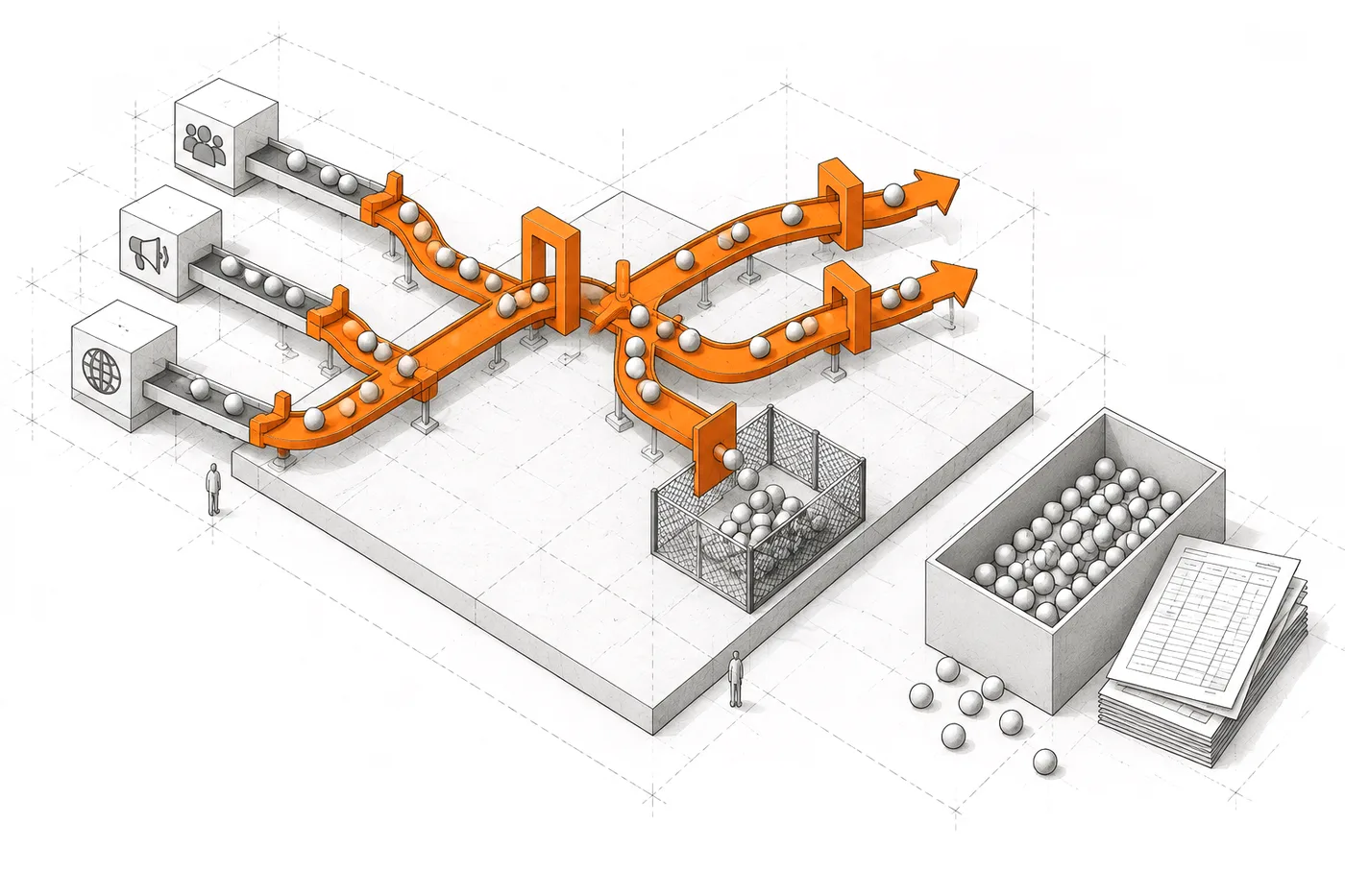
From the real sales process to a custom CRMLead sources, sales steps, contact rules and the team define a custom CRM that runs the pipeline, follow-up and campaigns.01LEAD SOURCES02SALES STEPS03CONTACT RULES04TEAMCRMPIPELINEFOLLOW-UPCAMPAIGNSFrom the real sales process to a custom CRMLead sources, sales steps, contact rules and the team define a custom CRM that runs the pipeline, follow-up and campaigns.LEAD SOURCESSALES STEPSCONTACT RULESTEAMCRMPIPELINEFOLLOW-UPCAMPAIGNS

02 / PROBLEM

The team ends up selling around the CRM.

When the CRM doesn’t reflect how the company sells, the real process moves somewhere else.

To another spreadsheet, to an inbox, to an export someone filters every Monday. The CRM is still there, but it’s no longer where the selling happens: it’s where what already happened gets recorded, late.

The result is duplication and distrust. Nobody knows which version of the customer is right, contact rules depend on someone’s memory and every sales report starts by reconciling sources.

It isn’t the team’s fault. It’s a tool designed for an average sales process applied to one that isn’t.

03 / SIGNALS

Signs your CRM is no longer your CRM.

If you recognise three or more, it won’t be fixed with more training or another custom field.

  1. 01The real pipeline lives in a spreadsheet; the CRM gets updated “when there’s time”.
  2. 02Sales reps export to Excel so they can filter the way they need.
  3. 03Opt-outs and “don’t call me again” are tracked from memory.
  4. 04Every campaign starts by copying contacts from one place to another.
  5. 05Management asks for a sales report and someone spends an afternoon putting it together.
  6. 06Custom fields hold things that aren’t what their names say.
FIG. 03The sales process decides the shape of the CRM
Axonometric drawing of a custom sales circuit: leads from several sources pass through orange gates and switches and some are diverted into an exclusion pen; next to it, a standard box with the same leads piled up beside spreadsheets

04 / FIT

When it makes sense to build your own CRM.

When what’s specific about the way you sell is exactly what a generic CRM handles worst.

Building makes sense if…

  • The way you win customers is part of your advantage: your own sources, your own qualification criteria, cycles that don’t match a textbook funnel.
  • You have contact rules that can’t depend on someone remembering them: opt-outs, rejections, daily limits, time windows.
  • The CRM has to talk to other pieces (your website, your product, your customer base) and today it does so through exports.
  • Several brands, branches or agencies share the same sales process but mustn’t see each other’s customers.

05 / STANDARD OR CUSTOM

A custom CRM or customising HubSpot, Salesforce or Zoho.

Customising an off-the-shelf CRM is often the right call. This is the line I use to decide.

Customising the standard one is enough if…

  • Your process looks like the one the CRM imagines: a classic funnel, opportunities and reps with their own accounts.
  • What’s missing can be solved with fields, automations or an integration the vendor already offers.
  • The team is small and the per-user cost won’t grow much.

A custom CRM pays off if…

  • There are so many customisations that nobody dares touch them and every change goes through a consultant.
  • Custom fields hold things that aren’t what their names say.
  • You pay per-user licences for people who only look things up, or for modules you only half use.
  • Your contact rules, your sources or the way you qualify leads don’t fit its model.

06 / WHAT I BUILD

What custom CRM development includes.

Only the pieces your process needs. Each one already exists in a system that’s running.

  • 01

    Leads from your own sources

    Forms, your own website, public sources or imports: every lead arrives with its source recorded and without duplicates.

    EvidenceZentia

  • 02

    A pipeline with your stages, not the vendor’s

    The stages, priorities and status history are the ones your team uses in everyday conversation.

  • 03

    A customer record that tells the story

    Contact details, notes, tasks, sources and everything that has happened with that customer, in one place and in order.

  • 04

    Campaigns with compliance rules

    Batched send queues, templates with variables and automatic exclusions applied on the server before anything is sent.

  • 05

    Context on what the customer has looked at

    When a lead comes from your website, the salesperson also gets what they viewed and the preferences they showed.

    EvidenceZentia

  • 06

    Data separated by brand or team

    One CRM for several business units, with isolation enforced in the database rather than the interface.

    EvidenceZentia

07 / INTEGRATION

Integration with your ERP, website and email, plus data migration.

A custom CRM doesn’t live in isolation: it connects to what already works and starts with your data, cleaned up.

  1. ERP

    Customers, orders and invoices from the ERP visible in the record, without copying them by hand. The CRM reads from the source; it doesn’t create a second version of the customer.

  2. WEB

    Forms on your website create the lead with its source and what the visitor looked at, as in Zentia.

  3. EMAIL

    Sends and campaigns from the CRM itself, with templates, batched queues and exclusions applied on the server.

  4. MIGRATION

    Contacts from your current CRM or spreadsheets are imported after reviewing duplicates, statuses and opt-outs, so the new system doesn’t inherit the old one’s problems.

  5. EXPORT

    Everything can be exported: the data is yours and doesn’t get trapped in the new CRM.

08 / ARCHITECTURE

The sales process, turned into a system.

Every stage is an explicit server rule, not a team habit.

FIG. 08From the lead’s source to management’s decision
  1. 01 — SOURCES

    Source

    Every lead arrives with the source that brought it.

    • WEB
    • FORMS
    • PUBLIC DATA
    • IMPORT
  2. 02 — QUALIFY

    Qualify

    Priority and status by your criteria, with history.

    • RULES
    • SCORE
  3. 03 — CONTACT

    Contact

    Tasks and batched campaigns with a daily limit.

    • QUEUE
    • TEMPLATES
  4. 04 — COMPLY

    Exclude

    Opt-outs, bounces and “do not contact” kept out of the queue, always.

    • SERVER RULES
  5. 05 — PIPELINE

    Decide

    Management sees what’s moving and what’s stuck.

    • DASHBOARD
    • CSV

09 / EVIDENCE

CRMs built on real sales processes.

Lead capture for agencies that share a core without sharing customers, and a prospecting CRM with compliance rules.

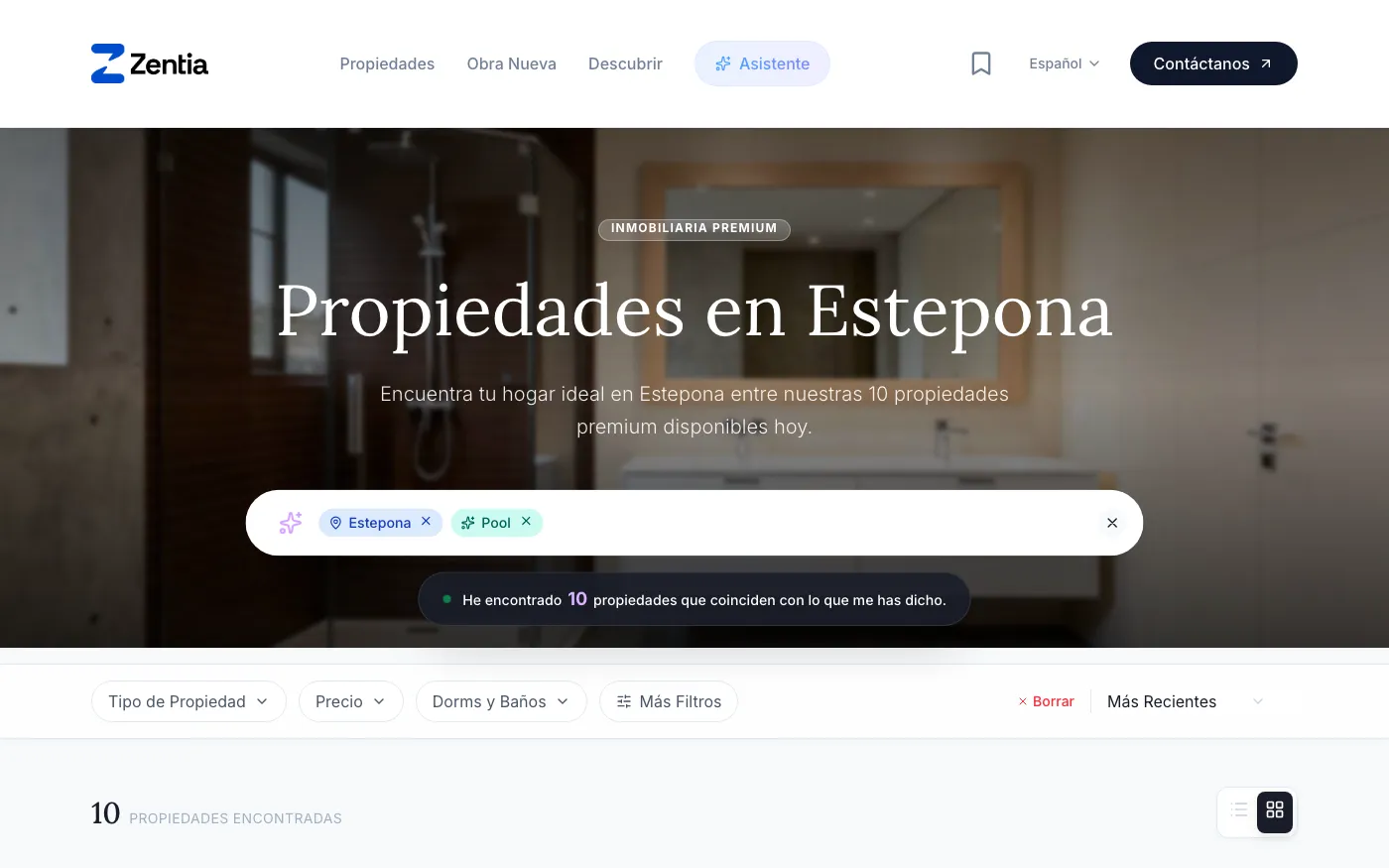
Zentia search: the Spanish phrase «casa en Estepona con piscina» (house in Estepona with a pool) turned into the filters Estepona and Pool, with ten properties found.
Natural-language search · zentia.pro

Multi-tenant platform

Zentia

Lead capture and follow-up inside each agency’s own platform, with each agency’s data isolated in the database.

  • Leads arrive with the properties they viewed and their inferred preferences.
  • Row Level Security isolates each agency’s data in the database itself.
  • Brand, colours and copy live in configuration: a new agency needs no new deployment.

STACK Nuxt 4 / Supabase / PostgreSQL

Case study: Zentia

ALSO BUILTGustela CRM, a prospecting CRM with leads imported from public sources, batched campaigns with a daily limit, five exclusion rules applied before anything is queued and a simulated mode that runs the whole flow without sending a single email.

10 / DON'T BUILD

When not to build a CRM.

If an existing product handles your process well, using it beats building another. I’ll tell you in the first conversation.

Better not to build if…

  • Your sales process looks like most of your sector’s: a well-configured off-the-shelf CRM will solve it sooner and cheaper.
  • The team doesn’t use the current CRM out of habit or lack of training, not because the tool can’t do what it needs.
  • It isn’t clear yet how you sell: settle and test the process first, even in a spreadsheet.
  • What’s missing is one specific integration between two tools that already work: connect them, don’t replace them.
  • You only want to add a chatbot or “sales AI” without a specific bottleneck behind it.

11 / QUESTIONS

Questions about custom CRMs.

01

What is a custom CRM?

A sales management system built on a company’s own sales process: its customer sources, its stages, its contact rules and the reports management needs. Unlike an off-the-shelf CRM, you don’t have to bend the process to fit the tool.

02

Is a customised CRM the same as a custom CRM?

Not quite. A customised CRM is usually an off-the-shelf one with extra fields, automations and modules; it still lives inside the vendor’s model. A custom CRM starts from scratch on your process. The first is quicker to get going; the second fits better once the customisations weigh more than the product.

03

How long until a custom CRM is up and running?

It depends on the process, but it doesn’t have to be built all at once. You start with what hurts most (usually the pipeline and the customer record) and extend it in phases: campaigns, tasks, integrations.

04

Can we import the contacts we already have?

Yes. Importing is part of the project: duplicates, statuses and opt-outs are reviewed before loading, so the new system doesn’t inherit the old one’s problems.

05

Does a custom CRM need AI?

Usually not. Gustela CRM, a prospecting CRM I built, uses no AI because its rules are clear, and Zentia’s natural-language search is handled with rules. AI is added only if there’s a task the rules don’t cover.

06

How much does a custom CRM cost?

It depends on how many pieces the first version needs, the integrations and the state of the data to migrate. The honest comparison is with what you pay today in per-user licences and in hours spent working around the CRM, over three to five years.

07

Who owns the CRM once it’s finished?

Your company does: the code, the database and the contacts. No per-user licences and no vendor deciding when the price goes up.

12 / SAME SYSTEM

Related systems.

A business problem rarely lives in a single piece. These usually appear in the same project.

All systems

How does your company sell when nobody’s looking at the CRM?

Tell me where your customers come from, what steps they go through and which rules can’t be broken. That’s enough to know whether you need your own CRM or a better-configured version of the one you have.