S.01 / LEGACY

Legacy software modernization without breaking what already works.

I modernize legacy platforms and applications in phases: I work out what they do, preserve the data, URLs and processes that have value, and replace the rest without switching off what works.

Modernizing a legacy systemLegacy data, old URLs, integrations and team processes move to a new platform with a clean data model, a 301 redirect map and a phased cutover.01LEGACY DATA02OLD URLS03INTEGRATIONS04TEAM PROCESSNEW PLATFORMCLEAN MODEL301 MAPPHASED CUTOVERModernizing a legacy systemLegacy data, old URLs, integrations and team processes move to a new platform with a clean data model, a 301 redirect map and a phased cutover.LEGACY DATAOLD URLSINTEGRATIONSTEAM PROCESSNEW PLATFORMCLEAN MODEL301 MAPPHASED CUTOVER

02 / PROBLEM

You can’t touch the old system. And you can’t leave it as it is.

Modernizing doesn’t mean rewriting everything. It means deciding what deserves to survive.

A legacy system is usually two things at once: where the company’s accumulated value lives (data, content, rankings, integrations) and the reason every change costs three times as much.

A full rewrite promises to clean everything up in one go and almost always underestimates what the old system did without anyone knowing. What works is a phased transition: understand first, then preserve and isolate, and only then migrate and rebuild, verifying at every step.

03 / SIGNALS

Signs your platform has fallen behind.

One on its own may just be maintenance. Several at once usually mean the system is already holding the company back.

  1. 01Nobody dares update the platform for fear of what might break.
  2. 02Every small change takes days because old patches have to be worked around.
  3. 03The data is there, but in a structure that no longer lets you query it.
  4. 04The website has years of authority on Google and any URL change is frightening.
  5. 05Integrations work “by some miracle” and nobody remembers how they were built.
  6. 06The vendor of the underlying technology no longer maintains it.
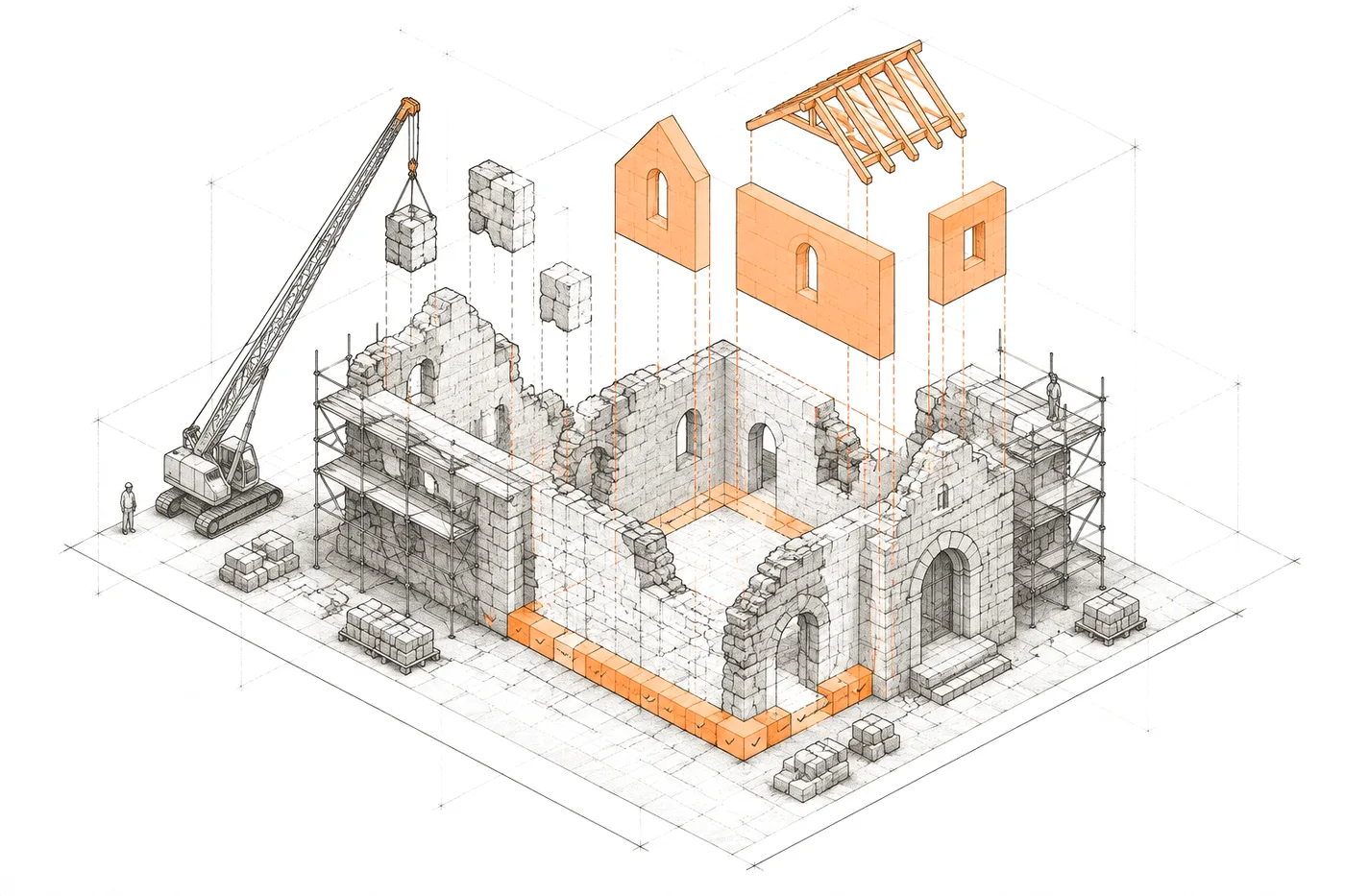
FIG. 03The foundations are kept; everything else is replaced, piece by piece
Axonometric drawing of an old building in scaffolding: the foundations are kept and marked in orange, a crane removes patched blocks and new orange modules are lowered onto the original structure

04 / FIT

When modernizing makes sense.

When the old system holds value and at the same time stops you building what comes next.

Modernizing makes sense if…

  • The system is still needed, but its structure stops the company from building what it needs now.
  • There are years of valuable data or content trapped in a model that doesn’t let you use them.
  • Maintaining the old system already costs more than replacing it piece by piece.
  • There’s a concrete risk: unsupported technology, security, or only one person who understands the system.

05 / WHAT I BUILD

What I’d do with your legacy system.

Historical data, URLs, SEO, integrations and processes: each piece with its own transition strategy.

  • 01

    Historical data migration

    ETL processes on the real production dump into a normalised model, without losing content along the way.

    EvidenceRocio.com

  • 02

    URLs and rankings preserved

    Every old URL redirects to its new destination in a single hop, based on each item’s legacy identifier.

    EvidenceRocio.com

  • 03

    A new content architecture

    A structure that matches what users search for today, without giving up the authority the domain already had.

  • 04

    Integrations isolated behind contracts

    Each external provider sits behind an internal interface: swapping it tomorrow doesn’t mean touching the rest of the system.

    EvidenceRocio.com

  • 05

    Existing processes respected

    The new tools are designed around how the team works today, not how the old system forced it to work. At Rocio.com one person approves everything that gets published, and the panel was built to make that sustainable.

    EvidenceRocio.com

  • 06

    Automated verification

    Tests that check every published route resolves, redirects arrive in one hop and nothing unconfirmed gets published.

06 / ARCHITECTURE

Six steps to change systems without losing anything.

Order matters: you don’t migrate what you haven’t understood or switch off what you haven’t verified.

FIG. 06Understand → preserve → isolate → migrate → rebuild → verify
  1. 01 — UNDERSTAND

    Understand

    What the system really does, what data it holds and who depends on it.

    • AUDIT
    • DATA DUMP
  2. 02 — KEEP

    Preserve

    What works and has value is protected before anything is touched.

    • URLS
    • DATA
    • SEO
  3. 03 — ISOLATE

    Isolate

    Integrations and dependencies behind internal contracts.

    • INTERFACES
  4. 04 — MIGRATE

    Migrate

    Data into the new model with repeatable processes.

    • ETL
    • LEGACY IDS
  5. 05 — REBUILD

    Rebuild

    In phases, starting with what blocks the most.

    • PHASES
  6. 06 — VERIFY

    Verify

    Nothing counts as migrated until it’s been checked.

    • TESTS
    • 301
    • COUNTS

07 / DATA MIGRATION

Data migration without losing history.

Old databases, validation and reconciliation, phased migration. The most underestimated part of any modernization.

  1. INVENTORY

    An inventory of what’s there: tables, fields that are actually used, fields repurposed for something else and data that only lives in loose files.

  2. REAL DUMP

    Work is done on the real production dump, not a sample copy. The odd data only shows up in the real data.

  3. REPEATABLE

    The migration is a process that can be rerun end to end, not a one-off manual run. It’s rehearsed as many times as needed.

  4. LEGACY IDS

    Every record keeps its old identifier, so it can be traced back to its source and its URLs redirected.

  5. RECONCILE

    Counts and totals are reconciled between source and destination: if they don’t match, it isn’t migrated.

  6. PHASES

    In phases, with the old system in service until the new one is verified. No blackouts on a date fixed blindly.

If the system you’re modernizing issues invoices in Spain, check how it fits with Verifactu: I cover it in Verifactu API: how to integrate Verifactu into your software or ERP.

08 / KEEP / DROP

What deserves to stay and what deserves to go.

Half the work of a modernization is this list.

What deserves to stay

  • Historical data, even if poorly structured: it gets transformed, not thrown away.
  • URLs that already rank and receive links, with their exact redirect.
  • Old identifiers, so every record can be traced back to its source.
  • Processes the team does well and the new tool should respect.
  • Integrations that work, even if they’re rewritten inside.

What deserves to go

  • Generic data structures that force you to rebuild every query.
  • Plugins and patches that only exist to work around the old platform’s limits.
  • Empty fields, or fields reused for things they aren’t.
  • Manual steps that only existed because the system couldn’t do them.
  • Dependencies on a provider nobody controls.

09 / EVIDENCE

A platform modernized without losing its history.

An archive going back to 1992, trapped in WordPress, rebuilt as its own system.

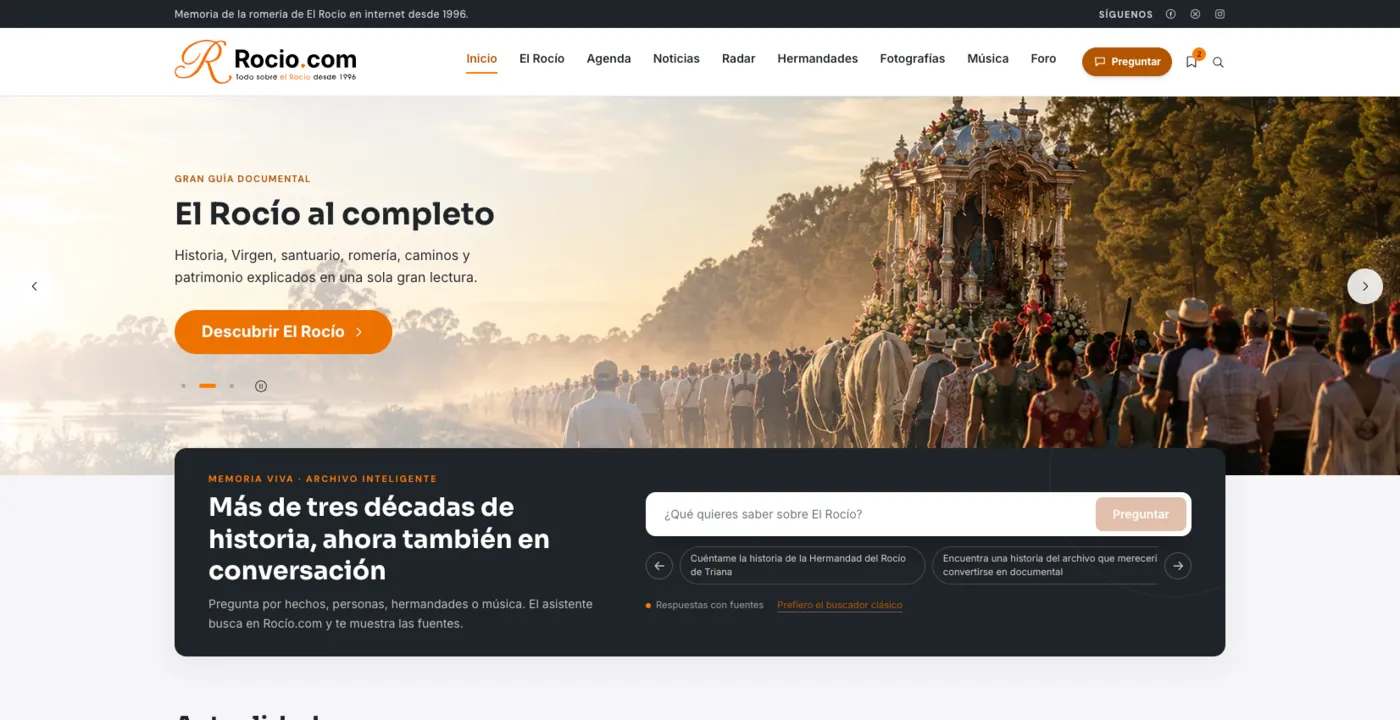
Rocio.com home page: the «El Rocío al completo» guide and a conversational search over more than three decades of archive.
Home page and conversational archive · rocio.com

Editorial platform

Rocio.com

A full migration from a WordPress site around 15 years old without losing content or links.

  • 102 tables in the production dump and 320,093 rows of text metadata, transformed into a normalised model.
  • 11,596 news articles and 47,401 media files migrated.
  • 301 redirects based on each item’s legacy identifier.
  • The AI provider isolated behind an internal contract: its index is rebuilt from the database.

STACK Nuxt / Vue / MySQL

Case study: Rocio.com

10 / DON'T REBUILD

When not to modernize.

An old system that works and can be maintained isn’t a problem. It’s an asset.

Better not to modernize if…

  • The system works, can be maintained and what’s missing is one specific feature: add it, don’t rewrite.
  • The only reason is that the technology is “no longer fashionable”.
  • There’s no time or people to validate the migration: modernising without verifying just loses data faster.
  • The plan is to rewrite everything at once and switch off the old system the same day.

11 / QUESTIONS

Questions about legacy modernization.

01

What is data migration?

Moving information from one system to another: extracting it from the source, transforming it into the new model and loading it into the destination, checking that nothing is lost or altered. When the source is an old database, the hard part is the transformation, not the copy.

02

Database migration or application migration?

They’re two levels of the same job. Database migration changes where and how the data is stored; application migration changes the system that uses it. In a modernization they usually go together, but they’re planned and verified separately.

03

Does modernizing mean rewriting everything?

No. Modernizing means deciding what to keep, what to isolate, what to migrate and what to rebuild. Sometimes replacing one piece and leaving the rest is enough; other times you need a new system, but built on the previous one’s data and URLs.

A system you can’t evolve isn’t yours
04

Will we lose Google rankings when we migrate?

The risk is real and it’s managed: every old URL with traffic or links gets a 301 redirect to its new destination, in a single hop, checked by tests.

05

How do you migrate data with years of history?

With repeatable ETL processes on the real production dump, not an idealised copy. At Rocio.com an archive going back to 1992, with 102 tables and 320,093 rows of metadata, was transformed into a normalised model.

Read the Rocio.com case study
06

Can we keep working during the modernization?

Yes: the transition is planned in phases so the old system keeps running while the new one is built and verified. The final switch happens when the checks allow it, not on a date fixed blindly.

12 / SAME SYSTEM

Related systems.

A business problem rarely lives in a single piece. These usually appear in the same project.

All systems

Which system are you afraid to touch?

Tell me what it does, what data it holds, what depends on it and what can’t be lost. We start by understanding it.